Supertrend Indicator: What It Is, How It Works, and How to Use It
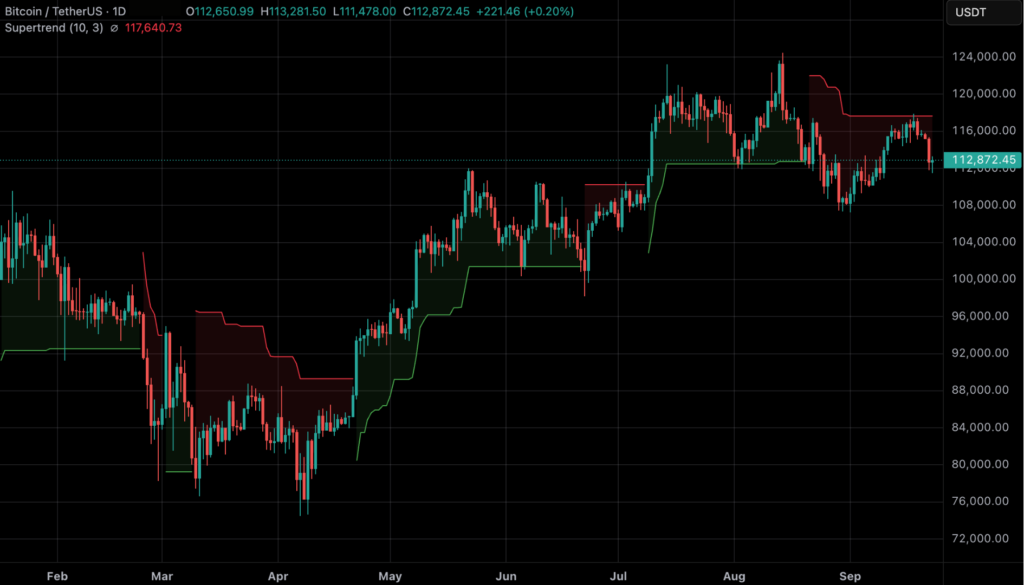
The Supertrend indicator is a popular trend-following tool developed by Olivier Seban in 2009. It uses the Average True Range (ATR) to measure market volatility and place a dynamic band around the price. On most charts, the Supertrend line appears below the price and turns green during a potential uptrend. It moves above the price and turns red when the market may be entering a downtrend.
Although the indicator is easy to read, it is not a guaranteed buy-or-sell system. Since it is based on past price and volatility data, the Supertrend is a lagging indicator and may react after a trend has already begun. It can also produce false signals when the market is moving sideways or remains highly choppy.
It works best in strongly trending markets and can give false signals in choppy or sideways conditions. For this reason, traders often use Supertrend in conjunction with other indicators (ADX, moving averages, RSI, etc.) to confirm trends before acting.
This guide explains how the Supertrend indicator works, how its formula is calculated, what settings such as 7 and 3 mean, and how to use it on TradingView. It also covers ways to confirm Supertrend signals using tools such as the ADX, moving averages and RSI before making a trade or risking capital.
The Supertrend indicator is a trend-following technical-analysis tool that combines price data with the Average True Range (ATR), a measure of volatility. It uses the ATR and a multiplier to calculate dynamic bands, then plots one active line on the chart.
The line is commonly shown in two colours:
A green line below price usually represents a bullish or uptrend condition.
A red line above price usually represents a bearish or downtrend condition.
Colours can be changed in chart settings, so the line’s position and the platform’s legend matter more than the colour itself. Because Supertrend uses historical price and volatility data, it is generally considered a lagging indicator. It can help structure a trade plan, but it cannot predict the next move or measure trend strength by itself.
Best Use: Trending markets – provides clear color-coded trend signals when price moves directionally.
Limitations: Can whip-saw in range-bound markets. Always confirm signals (e.g. with ADX, MA, RSI, VWAP) before trading.
How Does the Supertrend Indicator Work?
The calculation has three useful ideas: measure volatility, create price bands, and use the bands to determine which side of price the active Supertrend line should occupy.
Average True Range and the Supertrend inputs
The True Range (TR) of a candle is the largest of these three values:
TR = max(
current high − current low,
|current high − previous close|,
|current low − previous close|
)
The ATR applies a moving average or smoothing method to TR values over the selected ATR length. The exact smoothing implementation can vary by platform, so traders should use the platform’s documentation when they need to reproduce values programmatically.
The Supertrend has two main inputs:
ATR length: The number of candles used to estimate recent volatility.
Multiplier: The factor applied to ATR to determine how far the bands sit from the price midpoint.
A shorter ATR length or a smaller multiplier makes the line more responsive. It can produce earlier and more frequent flips, but it can also create more noise. A longer ATR length or a larger multiplier makes the line slower and can filter some short-term movement, but it may delay an entry or exit.
Supertrend Indicator Formula & Calculation (Step-by-Step)
Supertrend Indicator: Formula, Best Settings, Signals & Strategies
The Supertrend indicator combines price and volatility data to identify potential trend direction. It uses the Average True Range (ATR) to measure volatility and places dynamic bands above and below the price.
Step 1: Calculate the ATR
The ATR measures the average range of price movement over a selected number of candles, such as 10 or 14.
For each candle, the True Range (TR) is calculated as the largest of the following:
High − Low
Absolute value of High − Previous Close
Absolute value of Low − Previous Close
The ATR is then calculated by averaging or smoothing the True Range values over the selected ATR length.
Step 2: Calculate the basic bands
The indicator first calculates the midpoint of the candle, known as HL2:
HL2 = (High + Low) / 2
The basic bands are then calculated using the ATR and a multiplier:
Basic Upper Band = HL2 + (Multiplier × ATR)
Basic Lower Band = HL2 − (Multiplier × ATR)
The multiplier determines how far the bands are placed from the price. A higher multiplier creates wider bands and generally produces fewer, slower signals. A lower multiplier creates narrower bands and makes the indicator more responsive to price movements.
Step 3: Apply the final-band rules
The basic bands are not always the same as the Supertrend line visible on the chart. The platform compares each new basic band with the previous final band and the previous closing price.
For TradingView’s implementation:
Final Upper Band remains at the previous final upper band unless the new basic upper band is lower or the previous close is above the previous final upper band.
Final Lower Band remains at the previous final lower band unless the new basic lower band is higher or the previous close is below the previous final lower band.
This carry-forward logic helps prevent the bands from moving in a way that produces unnecessary trend changes.
Step 4: Determine the trend direction
The active Supertrend line uses:
The final lower band during a potential uptrend
The final upper band during a potential downtrend
The direction is determined using the previous Supertrend state and the current closing price. If the indicator is using the upper band and price closes above the relevant final upper band, the direction may switch to an uptrend. If it is using the lower band and price closes below the relevant final lower band, the direction may switch to a downtrend.
The exact calculation can vary slightly between platforms, so traders should check the formula used by the charting tool they are working with. TradingView’s Supertrend documentation explains its band and direction rules in detail.
Worked Supertrend Calculation Example
Assume:
HL2 = 100
ATR = 2
Multiplier = 3
The basic bands would be:
Basic Upper Band = 100 + (3 × 2) = 106
Basic Lower Band = 100 − (3 × 2) = 94
These values show how the ATR and multiplier create the initial price bands. However, they are not automatically a buy or sell signal. The final Supertrend line depends on the previous band values, the previous trend direction and where the current candle closes.
For example, if the relevant final upper band is 106 and the indicator is in a downtrend, a close above that band may trigger a shift towards an uptrend. Similarly, if the relevant final lower band is 94 and the indicator is in an uptrend, a close below it may trigger a shift towards a downtrend.
In simple terms:
ATR measures volatility and determines how much price is moving.
The multiplier controls the distance and sensitivity of the bands.
The final-band rules reduce unnecessary changes in the indicator.
A direction flip may indicate a potential trend change, not a guaranteed trade.
How to Read the Supertrend Indicator (Step-by-Step)
Reading Supertrend in an Uptrend
When the Supertrend flips green and appears below the price, it signals that buyers are in control. The distance between the price and the green Supertrend line shows how strong the trend is. A wide gap suggests momentum. A narrowing gap indicates weakening strength and potential reversals. Price making higher highs while staying above the green Supertrend line typically confirms a healthy uptrend.
Reading Supertrend in a Downtrend
When the Supertrend flips red and plots above the price, it suggests sellers have the upper hand. The red line acts as a dynamic resistance that price often struggles to break. Consistent lower lows while staying below the red Supertrend line confirm a strong downtrend. If the price starts closing near the red line frequently, the trend may be losing momentum.
Common Traps When Reading Supertrend in Sideways Markets
In range-bound conditions, the Supertrend may flip colors multiple times and give misleading signals. These are traps caused by low volatility and choppy price action. The safest approach is to ignore signals when the price moves sideways, especially when candles remain close to the Supertrend line. Using moving averages or ADX as filters helps avoid these whipsaws.
Best Supertrend Indicator Settings
The Supertrend has two knobs you can adjust:
ATR length → how many candles you use to measure volatility.
Multiplier → how wide the bands are around price.
Smaller numbers (like ATR=7, Mult=2) make the line react faster, giving more signals but also more false ones.
Bigger numbers (like ATR=14, Mult=4) make the line slower, filtering noise but sometimes missing quick moves.
There isn’t a one-size-fits-all. Traders change settings depending on timeframe, market, and style.
Common Settings by Style
Trading Style
Chart Timeframe
Typical Setting
Why
Scalping
1–5 min
(7,2)
Fast response for quick trades
Intraday
5–15 min
(7–10, 2–3)
Balanced; catches most moves
Swing
Daily
(10–14, 3–4)
Smoother, less noise over days
Position
Weekly
(14,4)
Very stable, long-term trends
Crypto (high volatility)
Any
(7–10, 2–3)
Reacts to sharp swings
Forex (range-bound)
Any
(10–14, 3–4)
Filters out choppy moves
These ranges are starting points for research, not fixed recommendations. Test them on the particular asset and include fees, spread, slippage, funding costs where relevant, and the exact exit rule.
Best Supertrend settings for intraday trading
For intraday trading, traders often test ATR lengths around 7–10 and multipliers around 2–3 on 5–15-minute charts. A lower setting reacts faster but may flip repeatedly during a quiet or choppy session. A higher setting filters more movement but may identify the trend after part of the move has already occurred.
An intraday workflow can be:
Check the higher-timeframe direction.
Add Supertrend to the intraday chart.
Wait for a candle close rather than trading an intrabar spike.
Confirm the direction with price structure, volume, a moving average, VWAP, RSI, or ADX.
Define the stop and position size before entering.
Best Supertrend settings for 5-minute and 1-minute charts
For a 5-minute chart, ATR 7–10 with a multiplier of 2–3 is a practical test range. For a 1-minute chart, traders may test faster combinations such as ATR 5–7 with a multiplier of 1.5–2, but the shorter timeframe can create significant market noise.
The lower the timeframe, the more important it is to:
Wait for a candle close.
Use a higher-timeframe trend filter.
Avoid trading every colour change.
Include spread, fees, slippage, and execution delays in testing.
Use a predefined maximum loss per trade.
There is no setting that makes a 1-minute or 5-minute strategy automatically reliable. A setting that looks effective on one coin, stock, or market phase may perform differently on another.
Best Supertrend Settings for swing and position trading
Swing and position traders generally prefer a slower setting that filters more intraday movement. ATR 10–14 with a multiplier of 3–4 can be used as a starting range on higher-timeframe charts. The trade-off is that the signal may arrive later, but the line may be less affected by small pullbacks.
The setting should match the holding period. A weekly chart with a short, highly sensitive setting can generate signals that are inconsistent with a longer-term plan. Backtest the setting on the same timeframe you intend to trade.
How to Use the Supertrend Indicator on TradingView, MT5, and Other Platforms
Supertrend Indicator on TradingView: How to Add and Change Settings
TradingView includes a built-in Supertrend indicator. The interface can change, but the general workflow is:
Open the chart for the asset and timeframe you want to analyse.
Select Indicators and search for Supertrend.
Add the built-in indicator, then open its settings.
Set the ATR length and multiplier, review the line against price, and save the layout only after testing it.
Use the built-in documentation or current TradingView interface if the labels differ. Do not assume that a template tested on one asset is suitable for another.
Supertrend Indicator on MT5 / MT4: Install, Download and Setup
MT5 or MT4 does not include Supertrend by default. Users must download a Supertrend indicator file (MQ5 or MQ4) from the platform’s marketplace or community library. After downloading, place the file in the Indicators folder, refresh the Navigator window, and drag it onto a chart. Settings can be adjusted from the Inputs tab.
Using Supertrend on Crypto Charting Platforms
Crypto platforms such as Binance, Bybit, KuCoin, and others often include Supertrend in their “Indicators” or “Trend” sections. Most platforms allow users to change ATR length and multiplier similarly to TradingView. The logic remains identical across platforms.
What does “7 and 3” mean?
The 7 means we calculate ATR from the last 7 candles.
The 3 means we multiply that ATR by 3 to set the bands.
So Supertrend (7,3) is just ATR length = 7, Multiplier = 3.
How to choose?
Start with the default (10,3) – it’s a good middle ground.
If you want faster signals, lower the numbers (like 7,2).
If you want safer, smoother signals, raise them (like 14,4).
👉 The golden rule: backtest first. Test different settings on past data for your chosen coin or market to see what works best.
Supertrend Indicator Buy and Sell Signals
Supertrend signals are conditional indications, not guaranteed trade instructions.
Chart condition
Common interpretation
What to check before acting
Price closes above the active line and the line moves below price
Potential bullish or long bias
Higher-timeframe trend, support/resistance, volume, and risk
Price closes below the active line and the line moves above price
Potential bearish or short bias
Market structure, liquidity, volatility, and risk
The line flips repeatedly around price
Possible consolidation or whipsaw conditions
Consider standing aside or using a range-specific plan
Price approaches the line during an existing trend
Possible trailing-stop or pullback reference
Whether the line is holding, where invalidation sits, and the trade’s reward-to-risk
For a long position, some traders use the green Supertrend line as a trailing reference and place the stop below it or below nearby structure. For a short position, they may use the red line as a trailing reference and place the stop above it or above nearby structure. The exact buffer should account for volatility and execution risk; placing a stop at the line without considering normal price movement can lead to premature exits.
Wait for the candle to close before treating a flip as confirmed. A temporary intrabar move can disappear before the close and create a false impression of a trend change.
How to Confirm the Supertrend Indicator and Avoid False Signals
Supertrend works best when price is moving directionally. In a sideways market, the line can switch sides repeatedly and create a series of losing or low-quality trades. No filter can eliminate false signals, but a structured confirmation process can prevent some avoidable mistakes.
A practical confirmation checklist
Check the market structure. Look for higher highs and higher lows in a bullish structure or lower highs and lower lows in a bearish structure.
Wait for the candle close. Do not treat a brief wick or intrabar spike as a confirmed flip.
Use a higher timeframe. If the higher timeframe is bearish, be cautious about taking every bullish signal on a lower timeframe.
Add one complementary tool. A moving average can provide a directional filter, RSI can add a momentum view, ADX can help assess trend strength, and VWAP can be useful for intraday context.
Check support and resistance. A bullish flip directly under strong resistance may have less room to move. A bearish flip directly above strong support may also need more confirmation.
Watch participation and events. Low volume, thin liquidity, and major market announcements can make technical signals less reliable.
Define invalidation before entry. Decide where the trade idea is wrong and size the position from that risk rather than from the desired profit.
ADX measures trend strength rather than direction, while RSI measures recent momentum. Neither should be treated as a mandatory confirmation rule. Common reference levels such as ADX 20–25 or RSI 30/70 are conventions that require testing in the asset and timeframe being traded.
The following strategies are educational frameworks. They do not guarantee a win rate, and each one should be tested with a complete entry, exit, and risk plan.
1. Basic trend-following strategy
Identify the direction on a higher timeframe.
Wait for the lower-timeframe Supertrend to align with that direction.
Confirm that the candle closes on the expected side of the line.
Enter only if the stop-loss location and position size are acceptable.
Exit when the trend condition fails, the stop is reached, or the predefined target is met.
This approach is designed to participate in directional moves. It is less suitable when price repeatedly crosses a narrow range.
2. Supertrend pullback strategy
In a bullish trend, wait for price to pull back toward the Supertrend line or another support area without invalidating the higher-timeframe structure. Look for a bullish rejection or close back in the direction of the trend before considering an entry. The bearish version uses a pullback toward the red line or resistance area.
The Supertrend line is not guaranteed support or resistance. A pullback can become a reversal, so the invalidation level must be defined independently.
3. Supertrend with moving-average confirmation
Some traders combine a Supertrend flip with a moving-average filter. For example, they may consider long setups only when price is above a chosen moving average and the Supertrend is bullish, and short setups only when price is below the moving average and the Supertrend is bearish.
The moving-average length is a strategy choice, not a universal rule. Using more filters can reduce the number of signals while still leaving the strategy exposed to false signals.
4. What Is the Three-Supertrend Strategy?
The three-Supertrend strategy uses three lines with different sensitivities:
Line
Role
Example logic
Fast
Responds quickly to short-term movement
Helps identify a recent change, but can be noisy
Standard
Represents the main trading timeframe
Provides the primary signal condition
Slow
Filters the broader direction
Helps avoid trades against the larger trend
A simple ruleset is to consider a long bias only when all three lines are bullish and price closes above the active lines. A short bias requires all three to be bearish and price to close below them. The fast line can be used as an earlier warning or a tighter trailing reference, while the slow line can define the broader invalidation.
There is no single standard combination for the three lines. The parameters should be tested together, not optimised until they fit only one historical period. Use out-of-sample data and paper trading to check whether the rules remain useful in a different market phase.
Supertrend vs Other Indicators
Supertrend answers a different question from many popular indicators. It focuses on trend direction and a volatility-adjusted line; it does not independently measure momentum, volume, or trend strength.
Indicator
Main question it helps answer
How it can complement Supertrend
Supertrend
Which side of price is the volatility-adjusted trend line on?
Provides the main directional or trailing reference
Moving average
Is price above or below a smoothed average?
Filters trades against the broader direction
RSI
Is recent momentum strengthening, weakening, or stretched?
Adds momentum context to a trend signal
ADX
Is the market showing directional strength?
Helps distinguish a trend from a weak range, but does not give direction alone
VWAP
Where is the session’s volume-weighted average price?
Adds intraday context and a reference for session bias
MACD
Is momentum accelerating or fading relative to moving averages?
Adds a momentum confirmation view
The Supertrend indicator is often compared to other popular tools. While they all help with trends or volatility, they work a bit differently.
The Chandelier Stop also uses ATR, but it anchors from the highest or lowest price since entry. This means it can hold longer through pullbacks, while Supertrend may flip earlier on smaller moves.
A moving average crossover (like 50 vs 200 SMA) gives trend signals too, but it usually lags more and can whipsaw in sideways markets. Supertrend reacts quicker and also provides clear stop levels, something moving averages don’t.
Bollinger Bands plot volatility bands around a moving average and are mostly used for spotting overbought or oversold zones. Supertrend is different—it’s one directional line that flips with the trend, making it better for trend-following.
VWAP shows the average price weighted by volume and is popular for intraday trading. It reflects where most trading happened, while Supertrend is purely price and volatility-based. Using both together can give stronger signals.
RSI and MACD measure momentum. RSI shows overbought/oversold levels, and MACD shows momentum and trend shifts. They aren’t replacements but are often used alongside Supertrend to confirm entries and exits.
In short, the Supertrend indicator focuses on trend direction and trailing stops, while other indicators highlight momentum, volume, or volatility in different ways. They often work best in combination rather than alone.
Works across multiple asset classes and timeframes
Settings need to be tested for each market and timeframe
Can provide a trailing-stop reference
Does not measure trend strength on its own
Easy to combine with other tools
A single indicator should not be used as a complete trading plan
The main benefit is clarity. The main risk is mistaking a clear visual signal for a complete decision. The indicator still needs context, risk limits, and a defined response when the market invalidates the setup.
Does the Supertrend Indicator Work?
The Supertrend indicator can be useful in a clear directional market because it follows price with a volatility-adjusted line. It is less reliable in choppy or range-bound conditions, where price can cross the line repeatedly.
There is no universal Supertrend accuracy, win rate, or profit rate. Any result depends on the asset, timeframe, settings, entry rule, exit rule, position sizing, fees, slippage, funding costs, and the period tested. A backtest should include:
A precise definition of the signal and candle-close timing.
Realistic fees, spread, slippage, and funding where relevant.
A meaningful number of trades across different market conditions.
A separation between the data used to develop the rules and unseen data used to test them.
A paper-trading or small-size phase before live deployment.
An indicator is not profitable by itself. A tested process and disciplined risk management matter more than finding a setting that looks perfect on a historical chart.
Bottom Line & Risk Note
The Supertrend indicator can help organise trend direction and act as a potential trailing-stop reference on a price chart. Its two main inputs are the ATR length and multiplier. Settings such as 10 and 3 can serve as starting points, but they are not guaranteed to work in every market or timeframe.
For more reliable signals, wait for the candle to close and consider the broader trend on a higher timeframe. You can also combine the Supertrend with tools such as moving averages, RSI, support and resistance, or the ADX. In sideways markets, the indicator may repeatedly switch between green and red, creating a series of false or unprofitable signals.
Before using a Supertrend-based strategy with real money, test it on historical data and practise through paper trading. Define your risk in advance, use sensible position sizes and place stop-losses according to your strategy. Some traders use the Supertrend line as a trailing-stop reference, while others place their stops beyond key support or resistance levels.
The Supertrend is best viewed as one part of a broader trading toolkit—not a magic solution. Its effectiveness depends on the market conditions, confirmation signals and risk-management process used alongside it.
It is an ATR-based, trend-following overlay that plots a dynamic line above or below price to help identify potential trend direction. It is lagging and can produce false signals.
Which is the best Supertrend indicator?
There’s no universal best — start with the default (10,3) and adjust based on your asset and timeframe.
What is 7 and 3 in Supertrend?
It means ATR is calculated over 7 candles and multiplied by 3 to set the bands.
Does the Supertrend indicator work?
Yes, the Supertrend indicator works well in strong trending markets because it follows price direction using volatility-based bands. It performs poorly in sideways or choppy markets, where frequent flips can create false signals. It works best when combined with confirmation tools such as moving averages, RSI, or ADX, and with proper risk management.
How do you read the Supertrend indicator?
You read the Supertrend by watching where the line appears: – A green line below the price means an uptrend and potential buy conditions. – Red line above price means a downtrend and potential sell conditions. – If the price stays on one side of the line while making higher highs or lower lows, the trend is strong. Frequent flips usually indicate consolidation or noise.
What are the best Supertrend settings for intraday trading?
ATR 7–10 with a multiplier of 2–3 on 5–15-minute charts is a common starting range to test. It is not a guaranteed best setting; validate it on the specific asset and include trading costs.
How do I use the Supertrend indicator on TradingView?
Open TradingView, click Indicators, search for “Supertrend”, and select the built-in version. You can adjust ATR length and multiplier in the Settings panel and customize colors or line thickness.
How do I add the Supertrend indicator to MT5?
MT5 does not include Supertrend by default, so you must download an MQ5 Supertrend file from the Marketplace or CodeBase.
How accurate is Supertrend / success rate?
Accuracy depends on asset, settings, and filters — backtesting is essential.
Which timeframe is best for the Supertrend indicator?
It works on all, but shorter settings fit intraday/scalping and longer ones suit swing or position trading.
How do you confirm a Supertrend indicator?
Confirm it with a candle close, higher-timeframe direction, price structure, and one complementary tool such as a moving average, RSI, ADX, or VWAP. Confirmation lowers some avoidable errors but does not remove risk.
Which is the Best indicator with Supertrend (ADX/RSI/MAs)?
ADX for trend strength, RSI for momentum, and MAs for overall direction — they all work well with Supertrend.
How is the Supertrend indicator calculated?
It uses the midpoint of price plus/minus ATR × multiplier, then flips when price closes beyond the band.
Who invented the Supertrend indicator?
French trader Olivier Seban introduced it in 2009.
What is the difference between Supertrend & ATR?
ATR measures volatility, while Supertrend uses ATR to plot a trend-following line.
Is Supertrend a leading or lagging indicator?
It is generally considered a lagging indicator because it uses past price and volatility data and reacts after price movement begins.
What is the Supertrend indicator formula?
The basic bands are calculated as HL2 + (Multiplier × ATR) and HL2 − (Multiplier × ATR), where HL2 = (High + Low) / 2. The active line then follows the platform’s final-band and direction rules.
What does 7 and 3 mean in Supertrend?
In a 7,3 setting, 7 is the ATR length and 3 is the multiplier. The first value controls how many candles are used to estimate volatility; the second controls how far the bands sit from price.
How do you avoid Supertrend false signals?
Wait for a candle close, check the higher-timeframe trend, and confirm the flip with structure or one complementary indicator. Frequent flips around price often indicate a range or choppy conditions.
Is the Supertrend indicator profitable?
It has no guaranteed or universal profit rate. Test the complete strategy—including entry, exit, costs, and risk management—on historical and out-of-sample data before using real money.
What is the three-Supertrend strategy?
It uses fast, standard, and slow Supertrend lines and considers trades only when the lines agree with the broader direction. The exact parameters are not universal and must be tested for the selected market.
Anush is a crypto researcher dedicated to making blockchain insights clear and accessible. A proud Solana maxi who still appreciates a good Layer 2 debate, he dives deep into market trends so others don’t have to (but really should). Passionate about simplifying crypto, he strives to make the space less intimidating and a lot more relatable, one report at a time.